
Let's Learn
- What is the Refund Policy for Transactions Processed by FGF?
- How to Issue a Refund for Transactions Processed by FGF
What is the Refund Policy for Transactions Processed by FGF?
Per our terms and conditions, transactions processed via FrontStream Global Fund are non-refundable. However, as a convenience to our customers, we will always do our best to accommodate refund requests. Whether we can process a refund will depend on the status of the funds at the time the request is received. For example, a refund may be approved if the donation has not already been disbursed to your organization or if there is other available activity on your account that can be used to offset the amount. Please feel free to submit a refund request HERE and it will be reviewed by our Customer Care team.
PLEASE NOTE:
Refund requests are reviewed on a case-by-case basis and are not guaranteed.
If a refund request cannot be accommodated, we recommend that the organization work directly with the donor or purchaser to arrange a refund outside of Panorama.
How to Issue a Refund for Transactions Processed by FGF
To Submit a Refund:
- Login to your Panorama User account.
- Choose the project type your organization is submitting the refund for.
Select the Panorama project type (Peer-2-Peer event, Campaign event or a Donation Page) > click Donations tab > click the donor profile you choose to refund:
Clicking on a donor profile will open up the Donation Summary for the donation that was made.
A “Request Refund " option has been added to the bottom of the Donation Details page in Donation Form projects.
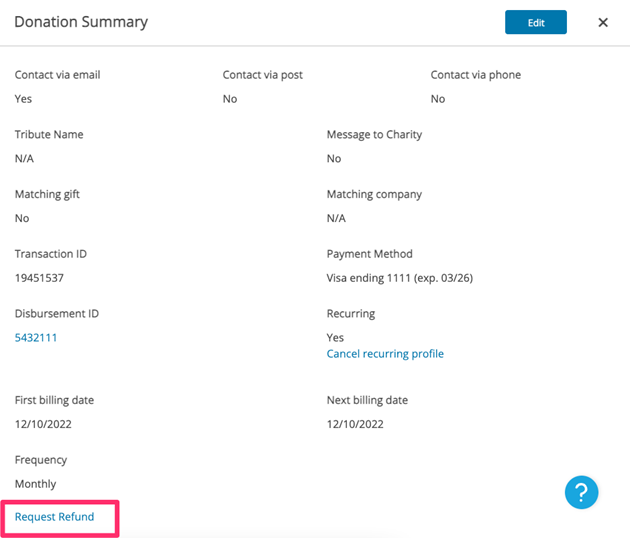
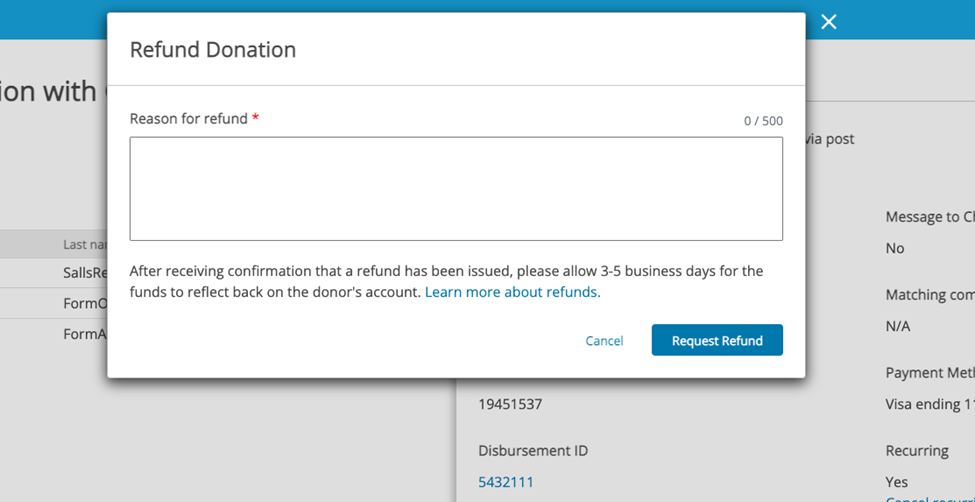
Selecting "Request Refund" will prompt the user to enter a Refund Reason.
The request then goes to the Distribution team for review.
The learn more about refunds will direct your organization to our help center article that outlines our refund policy and procedures for transactions made via FGF.
You can also submit a refund request HERE if you run into any issues submitting your refund request. Be sure to provide us with the email address of the individual who made the transaction, the transaction amount, and the transaction date.
After receiving confirmation that a refund has been issued, please allow 7-10 business days for the funds to reflect back on the user's account.
Comments
0 comments
Article is closed for comments.