
Summary
As part of our commitment to continuously update and enhance our Fundraising system, we recently made the following enhancements to the Artez Application:
- Artez P2P – Added Join Team functionality for Corporate Teams
- Reports - Added Offline donations report
Artez P2P – Added Join Team functionality for Corporate Teams
The “Join Team” button on the Corporate Team page and the Search page now ensures that registrants are directed through the appropriate registration steps based on the configuration of the event, while maintaining the correct affiliation with the selected Corporate Team.
Throughout the process, the Corporate Team affiliation is automatically applied and preserved based on the registrant option selected. Affiliation is handled automatically for all participation paths:
- When creating a team, the new team is automatically affiliated with the Corporate Team.
- When registering as an individual, the participant is automatically affiliated with the Corporate Team.
- When joining an existing team, only teams already affiliated with the selected Corporate Team will be available.
How to use
From the Corporate Team page or the Search page, click the “Join Team” button from a Corporate Team to begin the registration process. The registrant will be guided through the applicable registration steps according to the event configuration. During this process:
- Only locations associated with the selected Corporate Team will be available.
- If joining an existing team, only teams affiliated with that Corporate Team will be displayed.
- Corporate Team affiliation is applied automatically and does not require manual selection.
Donation Detail Report – Offline Transactions Version
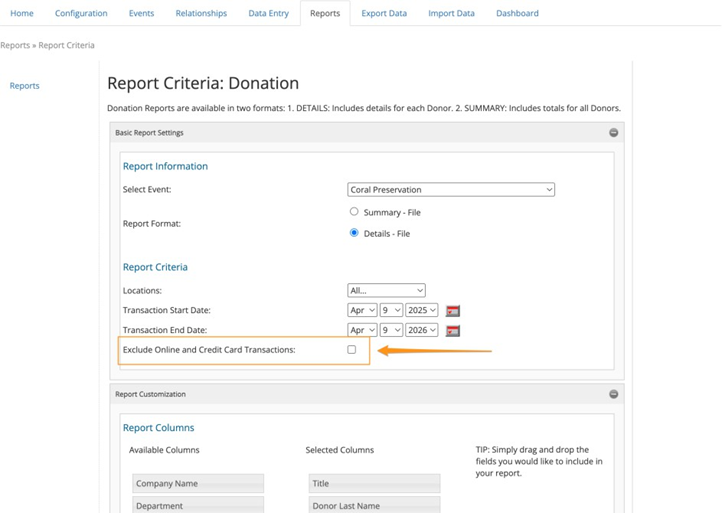
We have added a new version of the Donation Detail report that includes donation transactions that are not processed through the online donation flow. This report allows organizations to more easily review and analyze offline contributions by isolating transactions entered through alternative channels: data entry, participant entered offline donations and imports. User Defined Fields (UDFs) are included, allowing organizations to maintain access to custom data points required for reporting and analysis.
How to use
- In the Admin Console, navigate to the Donation Report section and select the Details version of the report.
- Within the report criteria, a new checkbox labeled “Exclude Online and Credit Card Transactions:” is available. Selecting this option will filter the report results to include only offline donations, based on the defined criteria.
- Select the desired columns for the report output, including any configured User Defined Fields (UDFs).
- The filter will apply to the dataset according to the selected columns.
Additional Items
- P2P - Ability to upload YouTube Shorts in video sections
- Donation Details report - Added Event Name and Location ExportID columns
- Reports - Added Text to Give column to Snapshot and Donation Details reports
- P2P - Fixed issue where offline donations were not displayed in Recent Donations on the Location Home Page
- P2P - Fixed issue where Location search in Content was not returning results
Comments
0 comments
Please sign in to leave a comment.